I did a lot of digital drawing and painting as a hobby. One of the most common problem I faced is the lack of quality of the scanned lines from the scanned drawing. Thus, an improvement on the scanned drawing is required before doing anything else. Before we start, I should warn you that this is the way that I found works, doesn't mean that there is not other way to do it. I'm using Photoshop and Corel Draw to do this, but I suppose any other application with similar features should work fine.
I prefer to trace a scanned hand-drawing before doing anything else. Tracing is nice because with tracing I can have an output in form of vector. Thus, further improvement could be made easily. However, tracing a scanned hand-drawing often caused many detail loss. Increasing trace resolution wouldn't help since the output will not posses simple, clear, and solid lines.
To overcome this situation, I propose to do a preprocessing for the scanned hand-drawing. I'm using a self hand-drawing with a manga-ish style. Forgive the quality, I'm only an amateur :)
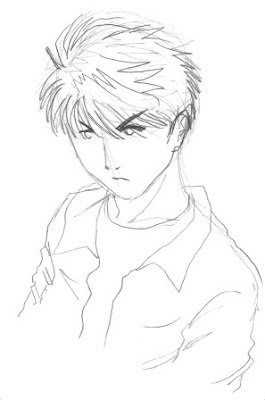
Once you scan your hand-drawing, we need to adjust the color intensity. I'm using "Level" feature of Photoshop and adjust accordingly.
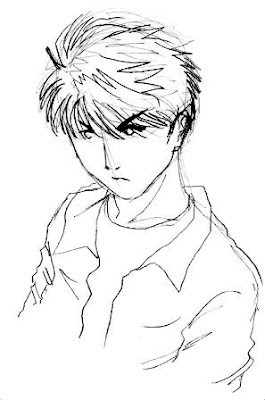
The next step is to apply a filter called "Photocopy" from Photoshop. I choose this because it will make the lines bolder and flatten (is this even the correct word?) the color.
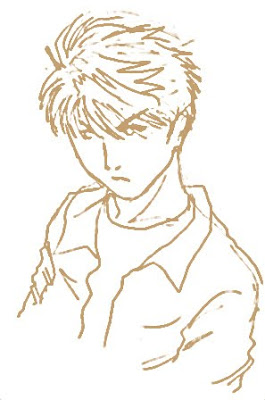
The resulting image is good enough for tracing. I import the image and do the tracing with Corel Draw.
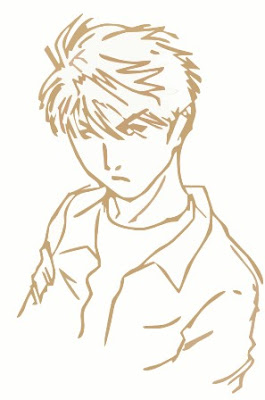
The result is clean and artistic. You can always make further adjustment easily since it is in form of vector.
I prefer to trace a scanned hand-drawing before doing anything else. Tracing is nice because with tracing I can have an output in form of vector. Thus, further improvement could be made easily. However, tracing a scanned hand-drawing often caused many detail loss. Increasing trace resolution wouldn't help since the output will not posses simple, clear, and solid lines.
To overcome this situation, I propose to do a preprocessing for the scanned hand-drawing. I'm using a self hand-drawing with a manga-ish style. Forgive the quality, I'm only an amateur :)

Once you scan your hand-drawing, we need to adjust the color intensity. I'm using "Level" feature of Photoshop and adjust accordingly.

The next step is to apply a filter called "Photocopy" from Photoshop. I choose this because it will make the lines bolder and flatten (is this even the correct word?) the color.

The resulting image is good enough for tracing. I import the image and do the tracing with Corel Draw.

The result is clean and artistic. You can always make further adjustment easily since it is in form of vector.